

As a person working in the field of cybersecurity, you are already aware of the necessity to constantly follow threats. This is made possible by a Security Operations Center (SOC) which is a team and a technology. But building a SOC can be expensive — unless you use SOC tools.
Source SOC tools are free, community-driven software solutions that help security teams detect, investigate, and respond to cyber threats. In this article, we will walk you through the top 10 open‑source SOC tools available today, how to build your own SOC stack, and tips to make the most of these tools — all in plain, simple language.
What Is a SOC?
A Security Operations Center (SOC) is a group of security personnel responsible for monitoring IT systems of an organization 24/7. They are tasked with identifying attacks and investigating suspicious activity as well as preventing threats before they can inflict harm. Consider a SOC to be a security control room. It has screens that indicate live data of the network and trained analysts who monitor anything suspicious. The SOC team leaps into action when some bad thing occurs, such as a hacker attempting to compromise.
There are numerous tools that are used by a SOC in order to accomplish this task. These are tools to collect logs, analyze traffic, identify malware and provide alerts. A SOC team will be operating in the dark without the correct tools. That is why open‑source SOC tools have become so popular — they give even small teams access to powerful security technology without a huge price tag.
Core Categories of SOC Tools — At a Glance
| Category | What It Does | Example Tool |
| SIEM | Collects and analyzes security logs | Wazuh, OSSIM |
| IDS/IPS | Detects network intrusions | Snort, Suricata |
| Threat Intelligence | Shares and analyzes threat data | MISP |
| SOAR | Automates incident response | TheHive |
| Log Management | Stores and searches log data | Graylog |
| Vulnerability Scanner | Finds system weaknesses | OpenVAS |
| Network Monitoring | Watches network traffic | Zeek |
Top 10 Open‑Source SOC Tools for 2026
1. Wazuh

Wazuh is one of the most popular open‑source SOC tools in the world. It is a free security platform that both SIEM (Security Information and Event Management) and XDR (Extended Detection and Response) can be found under the same roof. Wazuh is a service that gathers log information on the server, endpoints, and cloud systems and then processes the data to identify threats in real time. It is compatible with Linux, Windows, macOS, and cloud platforms.
It is popular among security teams since it is simple to install, has a clean dashboard, and includes built-in compliance screening of frameworks such as PCI DSS, HIPAA, and GDPR. Wazuh is also compatible with other tools and thus a wonderful starting point of any open-source SOC stack.
Key Features
- Threat detection engine in real-time.
- Inbuilt compliance and audit report.
- Supports on-premise and cloud.
Pros
- Free and fully open‑source.
- Vast and vibrant community support.
- Simple agent-based deployment.
Cons
- Unless decent server resources are available, it requires decent server resources.
- High-level tuning is time-consuming.
- The first thing can be the overwhelming feeling of documentation.
Pricing: Free and open‑source. Commercial support and cloud plans are available via Wazuh Inc. with custom pricing.
Best For: Enterprises
Website: https://wazuh.com
2. Suricata
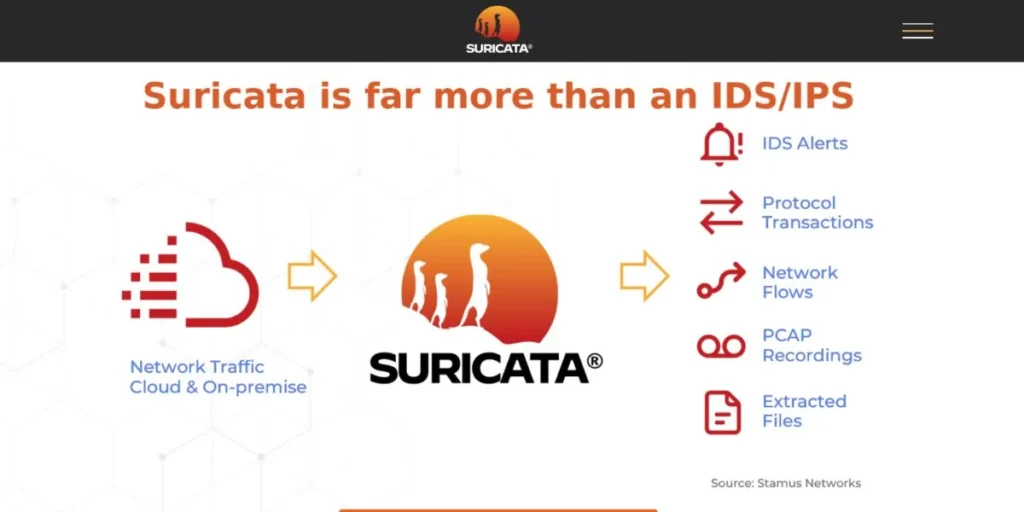
Suricata is a fast open-source SOC framework that is employed in network intrusion detection, prevention, and security surveillance. It is also able to analyze very high speeds of live network traffic and log files developed by the Open Information Security Foundation (OISF). Suricata employs signature (as rules) -based detection and protocol analysis in the discovery of threats. It is also multi-threading, meaning that it is capable of supporting a lot of traffic without losing speed.
Suricata also supports logs in other formats that are compatible with other tools such as Elasticsearch and Splunk. Enterprise security teams and government agencies have a large trust in it as they require a highly reliable and scalable IDS/IPS solution as a component of their open-source SOC configuration.
Key Features
- There is a multi-threaded high speed traffic inspection.
- Supports NSM modes, IDS and IPS.
- Supported by Snort format of rules.
Pros
- Supports extremely high traffic over the network.
- Good communal regulations and markings.
- Easy to integrate with ELK Stack.
Cons
- Expensive learning curve to entry.
- Management of rules may be complicated.
- The needs hardware resources performance.
Pricing: Completely free and open‑source. No commercial tiers listed on the official site.
Best For: Networks
Website: https://suricata.io
3. Snort

Snort is one of the oldest and most trusted open‑source SOC tools for network intrusion detection. SNort Packet detector developed in 1998 by Martin Roesch and currently supported by Cisco, it deconstructs network packets in real-time and compares them to a list of known attack signatures. It may operate in three modes, namely; packet sniffer, packet logger and network intrusion detection system.
Snort has an extensive set of both community and commercial rules which encompass a diverse array of threats such as malware, exploits and port scans. It is not heavy and can be operated with small hardware. Snort is frequently used as the initial network monitoring tool by teams that are developing a low-cost open-source SOC.
Key Features
- On-the-fly packet traffic monitoring.
- Large rule library of detection.
- Three operation modes which are flexible.
Pros
- Massive social and governance backing.
- Portable and simple to set up.
- Writes programs on cheap computers with ease.
Cons
- Not high speed single threaded.
- Comparison between the interfaces of older and Suricata.
- Business regulations involve subscription.
Pricing: Free and open‑source. Snort subscriber rules cost around $29.99/year for personal use. Business pricing is available separately.
Best For: Beginners
Website: https://www.snort.org
4. TheHive

TheHive is an Open‑Source SOC Tools that is used to respond to security incidents. It is a collaborative tool wherein SOC analysts are able to manage and probe security cases in collaboration. Bring to mind that it is like a catalogue of case files of your security team online. Once an alert has arrived, TheHive assists analysts in allocating tasks, following up, recording notes, and closing cases in a single place.
It is compatible with MISP in terms of threat intelligence and Cortex in automated analysis. TheHive also allows custom templates, so it is not very hard to make your team consistent in treating various kinds of incidents. It can be considered as a go-to tool to any mature open-source SOC interested in simplifying its incident response process.
Key Features
- The joint handling of incident cases.
- Compaq with MISP and Cortex.
- Incident workflow templates are custom.
Pros
- The best at team-based investigations.
- Not difficult to replace with other tools.
- Rigorous growth and community conferences.
Cons
- Installation is initially complicated.
- Large datasets result in slow performance.
- Technical knowledge is required to configure.
Pricing: Free and open‑source (Community Edition). TheHive Project also offers professional support plans with custom pricing.
Best For: Teams
Website: https://thehive-project.org
5. MISP (Malware Information Sharing Platform)
MISP is an Open‑Source SOC Tools that was designed with the purpose of sharing and analyzing threat intelligence. It enables security teams to save, distribute and relate data regarding malware, cyber criminals as well as attack methods. Governments, financial institutions and cybersecurity companies around the world use MISP. It has a massive support of data formats and it is capable of sharing intelligence automatically with partner organizations.
MISP is also connected to other frameworks such as MITRE ATT&CK so that one can more easily learn how attackers work. MISP is an important tool to any open-source SOC that wants to be ahead of the potential threats. It converts raw threat information into intelligence that can practically be acted upon by the analyst in his or her investigations.
Key Features
- Formal threat intelligence information exchange.
- Connection to MITRE ATT&CK framework.
- Use of automated event correlation.
Pros
- Relied on by international security agencies.
- Massive built-in sharing community threat.
- Support of flexible data format.
Cons
- Complex setup for new users.
- At times interface is counter-intuitive.
- Needs frequent changes and fixing.
Pricing: Completely free and open‑source. No paid tiers listed.
Best For: Intelligence
Website: https://www.misp-project.org
6. Graylog

Graylog is a popular open-source SOC tool of log management and analysis. It gathers logs of servers, applications, network devices, and cloud platforms, and allows you to search, filter, and visualize them using a clean web interface. Graylog is developed on Elasticsearch and MongoDB, and therefore it is highly scalable. Graylog would help security teams in consolidating all their log data at a central point making it a lot easier to identify an unusual activity.
It helps to use real-time warning, dashboards, and pre-configured security content packages. Graylog is a great open-source SOC tool that can be used on teams with a large amount of log data and offers a blend of the strength of enterprise log management with the flexibility of open-source software.
Key Features
- Single point log collection and storage.
- Search and alert functions in real-time.
- Ready to use security dashboards.
Pros
- Web interface is very user-friendly.
- Scares linear with increasing data volumes.
- Powerful API to personal applications.
Cons
- MongoDB and Elasticsearch set up required.
- The problem can be high consumption of memory.
- The paid version is required with advanced features.
Pricing: Free Open Source Edition available. Graylog Operations and Security plans start from custom pricing (contact sales). Cloud version also available.
Best For: Logging
Website: https://graylog.org
7. OpenVAS (Greenbone Vulnerability Management)
OpenVAS, now part of the Greenbone Vulnerability Management (GVM) framework, is one of the most widely used open‑source SOC tools for vulnerability scanning. It will probe your network and systems to identify known vulnerabilities to security such as old crusty software, patches not installed, or improperly configured services before attackers have a chance to pick them up. OpenVAS consists of large database of Network Vulnerability Tests (NVTs) which are updated regularly.
It is able to scan individual hosts or a whole network and generates detailed reports, which are used to direct teams on the items that they should fix. OpenVAS is also a necessary component of any toolkit of any open-source SOC that is interested in proactive security i.e. detecting holes before a hacker does.
Key Features
- Full vulnerability scanning of the network.
- Frequently revised NVT vulnerability database.
- Risk-based reporting in detail.
Pros
- Free and has a wide coverage of vulnerability.
- Proper to small and large network.
- Greenbone updates the database on a regular basis.
Cons
- Scans are extremely time consuming.
- Throughout scanning, there is heavy resource consumption.
- UI can be confusing at first.
Pricing: Free and open‑source via Greenbone Community Edition. Greenbone Enterprise appliances are available with paid licensing starting from custom quotes.
Best For: Scanning
Website: https://www.openvas.org
8. Zeek (formerly Bro)
Zeek is an effective Open‑Source SOC Tools of network security monitoring (NSM). OS Zeek does a thorough analysis of network traffic, unlike the traditional IDS tools that only scan through the network traffic looking for known attack signatures. (NIX). It logs data regarding associations, DNS queries, and HTTP requests, file transfers, and so on. These logs can then be used by security analysts to research incidences, identify anomalies or input data into a SIEM.
Zeek is particularly well used in large enterprise settings and in academic institutions due to its flexibility and level of analysis. It provides an open-source SOC teams with a rich forensic-level perspective of network activity that can be difficult to obtain with other tools.
Key Features
- Elaborate network traffic analysis engine.
- Monitors logs on the network in detail.
- Very adaptable through scripting language.
Pros
- Very fine network visibility offered.
- SIEM integrations are interesting to work with.
- Huge academic and corporate user base.
Cons
- No conventional IDS alarm system.
- Needs Zeek scripting experience to be customized.
- Large disk space to store logs.
Pricing: Completely free and open‑source. No commercial tiers on the official site.
Best For: Analysts
Website: https://zeek.org/
9. OSSIM (Open Source Security Information Management)

OSSIM was an open-source SOC tool created by AlienVault (since acquired by AT&T Cybersecurity) wherein various security functions are combined into one platform. It consists of SIEM, asset discovery, vulnerability assessment, intrusion detection, and behavioral monitoring, and all of these are included in a single package. The foundation of OSSIM is based over the popular tools such as Snort, OpenVAS and Nagios and integrates their powers under a single roof.
It is an excellent option among those teams that desire to have a fast, single-user open-source SOC system without the need to assemble various tools manually. Although it has not been updated in the recent years, it is still a good option in the case of a small to mid-sized organization that needs a free-of-charge and integrated security platform.
Key Features
- End-to-end unified security solution.
- Inventory and asset discovery internal.
- Integrates several open-source applications.
Pros
- Full SOC capabilities standard.
- Single appliance is easy to deploy.
- Effective foundations of small security units.
Cons
- Not as often updated in the recent years.
- Very large networks cannot be scaled.
- At least, support was largely AT&T-related.
Pricing: Free and open‑source. AlienVault USM (commercial version) has paid plans starting with custom pricing via AT&T Cybersecurity.
Best For: Small Businesses
Website: https://www.ossim.in/
10. Elastic Security (ELK Stack)

One of the most Open‑Source SOC Tools is Elastic Security which was developed based on the well-known ELK Stack (Elasticsearch, Logstash, Kibana). It enables security teams to consume, search and visualize huge volumes of security information of any source. Using Elastic Security, threats can be hunted, anomalies discovered through machine learning, and incidents acted upon all with the help of a single dashboard. Kibana delivers attractive, custom dashboards to enable one to easily know what is going on within your environment.
Another feature of Elastic Security is a list of ready-to-use detection rules that was mapped to the MITRE ATT&CK. In the case of existing organizations that use the ELK Stack to do logging, Elastic Security converts it into an entire open-source SOC platform.
Key Features
- Concentrated data of any origin.
- MITRE ATT&CK inbuilt detection rules.
- Anomaly detection using machine learning.
Pros
- Very flexible and extremely scalable.
- Customizable and beautiful Kibana dashboards.
- Very large user base and documentation.
Cons
- Complicated installation and configuration.
- Large hardware resource requirements.
- Certain features are behind the paid level.
Pricing: Free and open‑source basic version. Elastic Security paid plans (Platinum, Enterprise) start from custom pricing. Elastic Cloud subscription starts at around $95/month.
Best For: Scale-ups
Website: https://www.elastic.co/security
How to Build an Open‑Source SOC Stack (Step‑by‑Step)
It does not mean that it is overwhelming to build your own SOC using Open‑Source SOC Tools. The following is an easy step-by-step procedure:
- Determine the scope and resources of assets — Before you install any tool, enumerate all the systems, networks, and data that you require protection for; this way, you are aware of what you should monitor.
- Install a SIEM to begin with — To start with a tool such as Wazuh or Elastic Security to gather and store all the logs of all your systems in one location.
- Add network detection — Suricata or Snort can be installed on your network and monitor malicious traffic and intrusion attempts.
- Combine threat intelligence — Bond MISP to input fresh threat information to your SIEM to enhance the intelligence of your detection.
- Develop an incident response flow — Have your team employ TheHive to develop a systematic process to investigate, monitor, and close security incidents in the most effective manner.
Challenges and Best Practices for Running Open‑Source SOC Tools
The best open-source SOCs have their challenges. This is what to watch out on – and how to manage it:
- Fatigue in alerts is a thing — Fatigue in alerts can be extremely real, as there are too many false alarms, whose detection rules should be changed regularly to cut the noise.
- Experienced personnel are needed — Open-source tools are potent but not ready to use; train your personnel to be able to enable and make efficient use of them.
- Maintain up-to-date tools — The old open-source software may become a liability to security, and thus, have periodic updates and patching schedules.
- Scalability plan — When your organization expands your log volume and number of alerts will expand as well, plan your stack to scale initially.
- Write it down — A well-documented SOC setup and playbooks/workflows assist in faster new team member onboarding and limit the number of mistakes.
7 Types of Cybersecurity
Endpoint Security protects the devices of individuals, such as laptops, phones, and servers, against malware, ransomware, and unauthorized access.
- Application Security — It is aimed at ensuring that software and web applications are not susceptible to bugs and other weaknesses that may be used by hackers.
- Cloud Security — Secures data, applications, and infrastructure that is hosted in cloud infrastructures, such as AWS, Azure, and Google Cloud.
- Information Security — Refers to the policies and controls that prevent unauthorised access, alteration or destruction of sensitive data.
- Identity and Access Management (IAM) — Provides access to the correct systems by the correct people through authentication and authorization controls.
- Operational Security (OpSec) — The operational protection of sensitive information by processes and decisions that ensure that adversaries do not get access to sensitive information.
Conclusion
A modern SOC can be built without being very costly. Even small teams can afford to install an enterprise-grade security surveillance with the right open-source SOC tools without busting the budget. Since SIEM systems such as Wazuh and Elastic Security, network detection engines such as Suricata and Snort, and threat intelligence systems such as MISP – the Open‑Source SOC Tools ecosystem is deep, well-developed, and widening annually. The key is to start simple. Choose one or two of the tools that address your most pressing issues, make them work, and then continue adding to the stack thereafter. This article includes a step-by-step guide that you can use to establish your base, and observes the best practices to escape common pitfalls.
These open-source SOC tools provide enough power to power-up your threat detection, incident investigation, and organization protection, even starting with a small security team of one. All you really need is time, education and a determination to be secure. Start today. The first tool in your open-source SOC is all you need.
FAQs
What are open-source SOCs?
Open source SOC tools are open-source security software applications that assist in teams to monitor, detect and respond to cyber threats without exorbitant licenses.
Is Wazuh really free?
Wazuh is totally open-source and free. You will only pay when you require commercial support or managed cloud hosting of Wazuh Inc.
Does open-source SOC tools work with a small business?
Absolutely. Other tools, such as OSSIM and Snort, are minimalistic and suitable to small teams that have limited budgets and simple infrastructure requirements.
Do open-source SIEM tools substitute commercial SIEM systems?
They are able to do so in numerous organizations. Some of the open-socio tools such as Elastic Security and Wazuh have similar features to most commercial SIEM offerings.
What is the required number of open-source SOC tools?
Begin with two or three essential tools: a SIEM, a network IDS, and an incident response platform and add additional ones as your staff and requirements expand.